Tools
Tool system in AgenticX.
Tools
Tools are the contract between the model and the environment: filesystem, shell, MCP, REST, and skills. The runtime collects schemas, routes tool_calls, and runs them through policy and hooks.
Use @tool / BaseTool in the SDK. Near / Studio uses STUDIO_TOOLS in agenticx/cli/agent_tools.py plus dispatch_tool_async. Do not assume every library tool is registered in Studio.
Worked example: one tool card, not one bubble per call
Scene. “List open issues on this repo” needs GitHub MCP.
- Settings → MCP: the server must show Added (green). Connecting is not the same as
mcp_callsucceeding. - In chat, ask for the issue list. The model should call
mcp_call(or a discovered tool name) throughdispatch_tool_async. - Group chat must fold “calling tool / tool done” into one card for that avatar. A normal pane uses
ToolCallCard, folded unless it needs inline confirm.
What you should see. A card aligned with the assistant bubble. Expand to read arguments and the result. Failures should show a readable error (missing npx, Docker hang, schema mismatch), not a silent spinner.
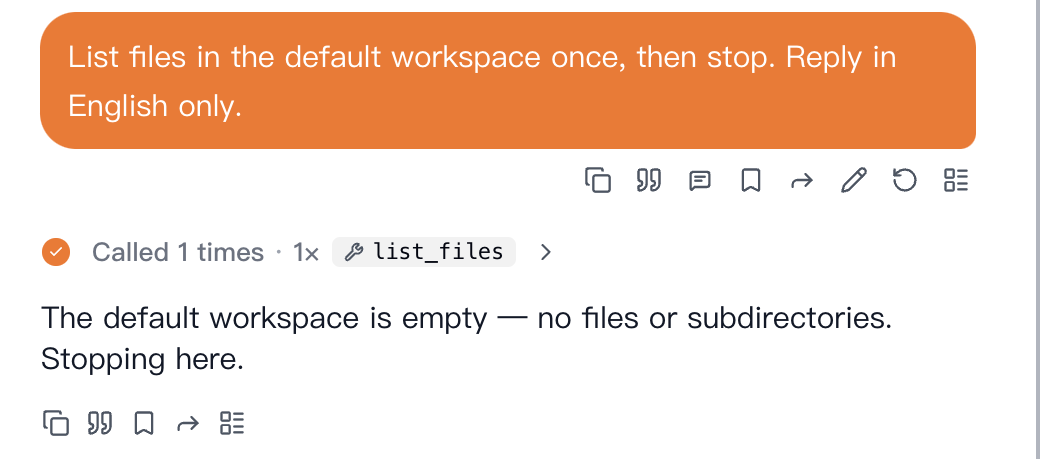
list_files call stays on a single line until expanded.| Concern | Primary components |
|---|---|
| Declaring tools | @tool, FunctionTool, BaseTool subclasses |
| Studio / workspace | STUDIO_TOOLS (OpenAI-style function schemas + dispatch) |
| External MCP | MCPHub, MCPClientV2, RemoteTool |
| Spec-driven HTTP APIs | OpenAPIToolset |
| Skill packages | SkillBundleLoader, SkillTool |
| Execution | ToolExecutor (agenticx.tools.executor) |
| Isolation hints | SandboxPolicy, SandboxConfig |
@tool decorator
Use agenticx.tools.function_tool.tool to turn a plain function into a FunctionTool (BaseTool).
Parameters
| Parameter | Role |
|---|---|
name | Tool id exposed to the model; defaults to the function name |
description | Overrides auto-parsed docstring summary |
args_schema | Optional Pydantic BaseModel; if omitted, a model is built from type hints and docstring Args |
timeout | Per-tool timeout (seconds), combined with executor defaults |
organization_id | Optional tenant scope for policy / storage |
Behavior
- Docstrings are parsed (short + long description, per-parameter text).
- Parameters are mapped to a Pydantic model for JSON Schema export and runtime validation.
1from agenticx.tools.function_tool import tool23@tool(name="add", description="Add two integers.", timeout=5.0)4def add(a: int, b: int) -> int:5 """Add a and b.67 Args:8 a: First operand.9 b: Second operand.10 """11 return a + b
Built-in Studio tools
Studio sessions use STUDIO_TOOLS in agenticx.cli.agent_tools: a list of OpenAI-style function definitions wired to async handlers. Core categories:
| Name | Purpose |
|---|---|
bash_exec | Run shell commands in the workspace (with guards and confirmations where applicable) |
file_read | Read file content with optional line range |
file_write | Full-file write after diff preview and user confirmation |
file_edit | Targeted replace after diff preview and confirmation |
list_files | List workspace files |
codegen | Drive the code generation engine (agent / workflow / tool / skill targets) |
mcp_connect, mcp_call, mcp_import | Connect to MCP servers, invoke tools, import external MCP JSON |
skill_use, skill_list | Activate or enumerate skill bundles |
todo_write | Structured task list for the session |
scratchpad_read, scratchpad_write | Session scratchpad |
memory_append, memory_search | Lightweight memory helpers |
lsp_goto_definition, lsp_find_references, lsp_hover, lsp_diagnostics | LSP-backed navigation and diagnostics |
Meta-only tools (delegation, resource checks, etc.) are defined separately (META_AGENT_TOOLS); avatars typically receive the Studio subset above.
MCP Hub
MCPHub (agenticx.tools.mcp_hub) aggregates multiple MCP servers:
MCPClientV2: one client perMCPServerConfig, persistent session,discover_tools()/call_tool().discover_all_tools(): merges tool lists and builds a routing table (handles name collisions with prefixed routed names).get_tools_for_agent(): whenauto_mode=True, returnsMCPHubToolinstances (BaseTool) ready for injection.MCPHubConfig: Pydantic model withservers: List[MCPServerConfig]andauto_mode.
1from agenticx.tools.mcp_hub import MCPHub, MCPHubConfig2from agenticx.tools.remote_v2 import MCPServerConfig34config = MCPHubConfig(5 servers=[6 MCPServerConfig(name="docs", command="npx", args=["-y", "@some/mcp-server"]),7 ],8 auto_mode=True,9)10# hub = MCPHub.from_config(config) # then await hub.discover_all_tools()
Configuration files
load_mcp_config()inagenticx.tools.remotereads a JSON file (default~/.cursor/mcp.json) intoDict[str, MCPServerConfig].- You can maintain the same structure in a project-local file (for example
mcp_config.json) and load it with an explicit path.
Remote tools
AgenticX does not ship a class named RemoteToolProvider. Remote capability is modeled as:
| Type | Use |
|---|---|
RemoteTool | One BaseTool wrapping a single MCP tool on a given MCPServerConfig |
MCPClient | Legacy client helper to list tools and construct RemoteTool instances |
MCPClientV2 | Preferred session-based client; used internally by MCPHub |
MCPServerConfig fields include command, args, env, timeout, optional cwd, enabled_tools, and assign_to_agents for filtering.
OpenAPI toolset
OpenAPIToolset (agenticx.tools.openapi_toolset) builds BaseTool instances from OpenAPI 3.x or Swagger 2.0:
OpenAPIToolset.from_file(path)OpenAPIToolset.from_url(url)
Operations become callable tools with generated parameter models and HTTP execution aligned to the spec.
Skill bundle
Skills follow the Anthropic-style SKILL.md layout with YAML front matter. SkillBundleLoader (agenticx.tools.skill_bundle) scans standard locations (.agents/skills, .agent/skills, ~/.agents/skills, .claude/skills, package builtins, etc.), applies optional SkillGate rules (metadata.agenticx.gate), and exposes skills as tools (e.g. SkillTool) for list/read and progressive disclosure.
Session-level injection
- In Studio,
skill_use/skill_listtie into the loader so activated skills affect the current session context. SkillBundleLoaderacceptsexecution_backendfor sandboxed or alternate execution paths when running skill payloads.
AGX Bundle installs also land in ~/.agenticx/skills/bundles/, which is automatically included in the scan paths, so bundled skills are discovered without any extra config.
AGX Bundle
An AGX Bundle (agenticx.extensions) is a distributable directory package that combines Skills, MCP server configs, Avatar presets, and Memory templates into a single distributable unit.
1my-bundle/2├── agx-bundle.yaml3├── skills/4│ └── my-skill/SKILL.md5├── mcp/6│ └── server.json7├── avatars/8│ └── preset.yaml9└── memory/10 └── template.md
Key modules:
| Module | Purpose |
|---|---|
agenticx.extensions.bundle | Parses agx-bundle.yaml, enforces safe relative paths |
agenticx.extensions.installer | Install / uninstall bundles, manages ~/.agenticx/bundles.json |
agenticx.extensions.registry_hub | Multi-source marketplace search & install |
Quick install:
1from pathlib import Path2from agenticx.extensions.installer import install_bundle34result = install_bundle(Path("./my-bundle"))5print(result.skills_installed, result.mcp_servers_installed)
See Extensions & Skill Ecosystem for the full guide including AGX Bundle format, marketplace configuration, and Desktop UI walkthrough.
Tool executor
ToolExecutor (agenticx.tools.executor) is the shared execution pipeline for BaseTool instances.
Typical flow (execute / aexecute)
- Optional
policy_stack.check(tool.name)— declarative deny rules (OpenClaw-inspired). - Resolve timeout from the tool and
default_timeout. - Optional
SafetyLayer.validate_tool_input— block or flag arguments before run. tool.run/tool.arun— internally validates kwargs againstargs_schema(Pydantic).- Optional
SafetyLayer.sanitize_tool_outputfor string results. - Optional
post_state_hookon the tool for state sidecars. ToolCallingRecordappended (success or failure), with rolling retention.
Retry and timeout
| Constructor arg | Meaning |
|---|---|
max_retries | Extra attempts after failure (default 3) |
retry_delay | Sleep between attempts (seconds) |
default_timeout | Fallback if the tool has no timeout |
Retries skip obvious non-retriable cases (e.g. ToolTimeoutError).
Related
ApprovalRequiredErrorbubbles out without being treated as a generic failure.sandbox_config: SandboxConfigenables advanced backends (subprocess,microsandbox,docker) for code execution helpers on the same class.
Credential management
CredentialStore (agenticx.tools.credentials) stores encrypted key–value material under ~/.agenticx/credentials by default (Fernet when cryptography is installed). Use it for API keys and tokens that tools or MCP env maps need at runtime.
SecurityManager (agenticx.core.security) also embeds a CredentialStore for higher-level permission and audit integration.
Sandbox integration
SandboxConfig (agenticx.tools.executor) selects a backend for advanced runs:
| Backend | Isolation |
|---|---|
subprocess | Separate OS process |
microsandbox | Sandboxed runtime (when available) |
docker | Container isolation |
auto | Resolver picks a implementation |
SandboxPolicy (agenticx.safety.sandbox_policy) recommends backends from risk level or tool name heuristics:
| Inferred / assigned risk | Suggested backend |
|---|---|
LOW | No forced backend (None) |
MEDIUM | subprocess |
HIGH / CRITICAL | docker |
Optional ToolRiskProfile entries override inference per tool_name (force_backend, network_enabled, max_timeout).