Skills & Evolution
SKILL.md lifecycle, security scan, per-skill switches, and observation-driven learning.
Skills & Evolution
A skill is a folder with SKILL.md. The runtime can list, scan, patch, version, and enable or disable one skill at a time. This is not “install a package and every listed CLI is called this turn.”
Use skills when you want a reusable procedure in the tool loop. Do not expect a skill to run just because the model mentioned mdfind in prose.
Where skills are loaded
build_skill_search_paths() merges always-on roots with skills.preset_paths and skills.custom_paths in ~/.agenticx/config.yaml. ~/.agenticx/skills/ is a core root (one extra directory level if the first level has no SKILL.md).
Each summary has a source (builtin, cursor, claude, registry, bundle, agent_created, …).
Enable and disable
- Global:
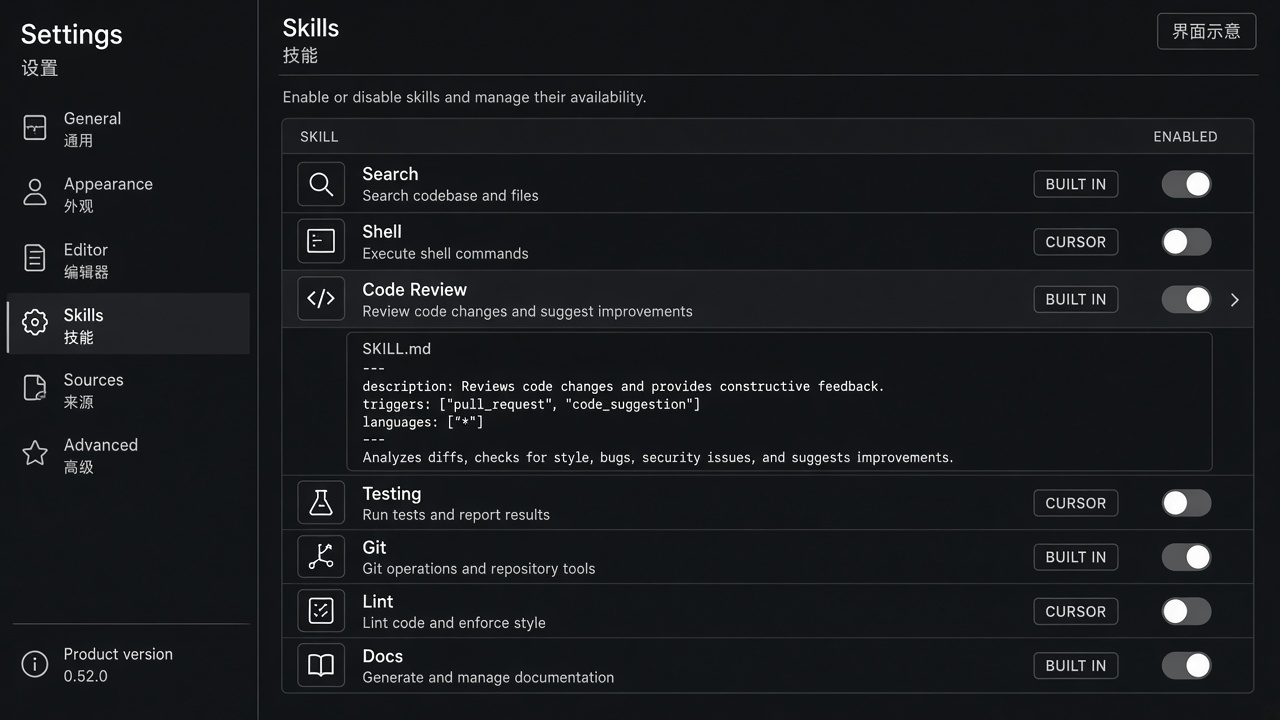
skills.disabledin config, mirrored by the Skills tab switches - Avatar:
skills_enabledon the avatar; default inherits global, only explicit offs are stored
GET/PUT /api/skills/settings is the Studio surface.
Safety
agenticx/skills/guard.py scans for exfiltration, credential, injection, and destructive patterns. Failed scans must show a readable category or rule, not a generic “high risk”.
skill_manage (create / patch / delete) writes under ~/.agenticx/skills/<name>/. It is gated by AGX_SKILL_MANAGE (default off). Names may contain a single safe subpath such as ima/notes.
Patches use a five-strategy fuzzy matcher. Each change appends <skill_dir>/.changelog.
Self-evolution
agenticx/learning/ records tool-call observations on the current session (tool_call_observations.json). A background review can propose a skill. Creation still needs:
- learning enabled (
learning.enabled/AGX_LEARNING_ENABLED) - enough tool-call signal
- quality gate (min steps, success evidence, dedup, guard scan, actionability)
This is not a promise that every chat invents a skill.
Bundles
AGX Bundles can ship skills together with MCP servers, avatars, and memory templates. Install and marketplace search: Extensions.
Worked example: turn one skill off
Scene. A builtin skill is noisy for this avatar; you want it gone from the tool loop without deleting the folder.
- Open Settings → Skills. The list must be expandable (Show all), not a silent truncation.
- Filter by source if needed; the rows must match that source.
- Toggle the skill off. Global offs write
skills.disabledin~/.agenticx/config.yaml. Avatar offs write only the explicit off intoskills_enabled. - In chat,
skill_use/ the visible skill list should omit it. Mentioning a CLI in prose still does nothing by itself.
What you should see. The same switch style as other settings. A failed security scan shows a readable rule, not “high risk”. After a marketplace install, the new skill jumps to the top as added — not another “Add” button.