Architecture
AgenticX system architecture overview.
Architecture
Overview
AgenticX is one capability core with three product forms on top:
- Core / Runtime: Python SDK, Studio Server, and Agent Runtime
- Near Desktop: local-first workspace; default path is local
agx serve - Enterprise: Portal, Admin Console, and Go AI Gateway for governed web access
Near and Enterprise share abstractions. Their current deploy paths are independent. The Gateway is compliance and model relay, not a full Agent Runtime.
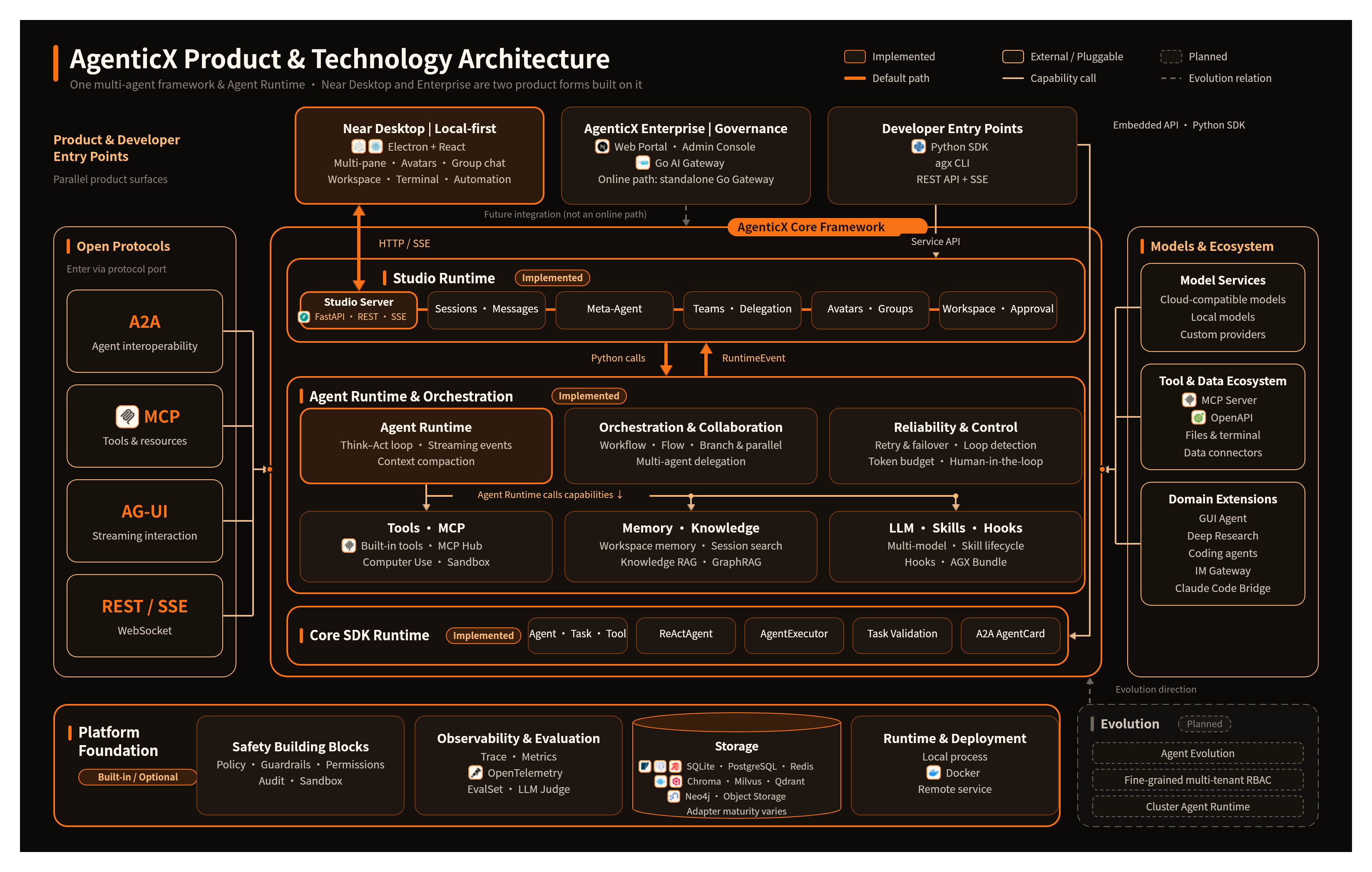
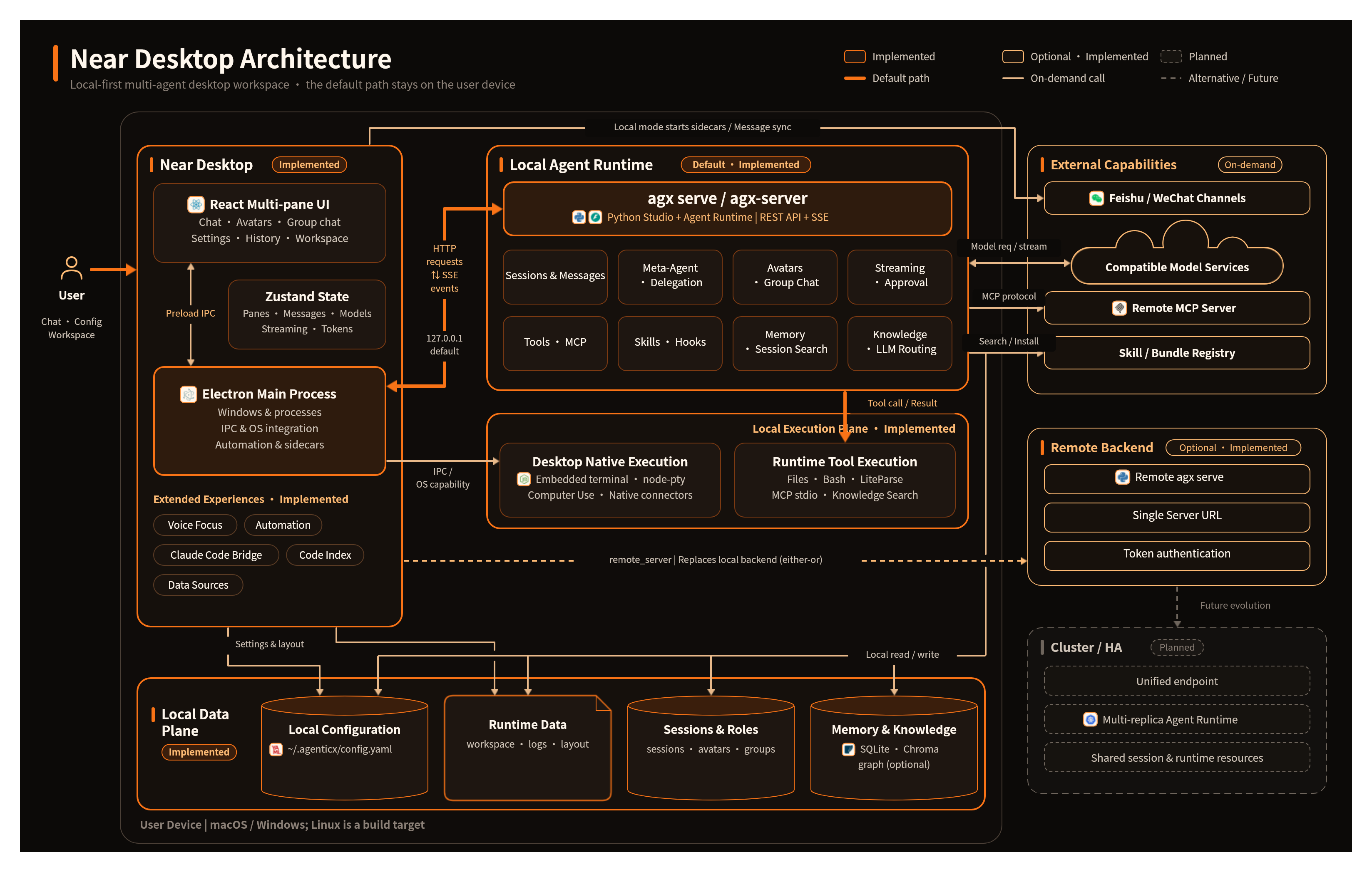
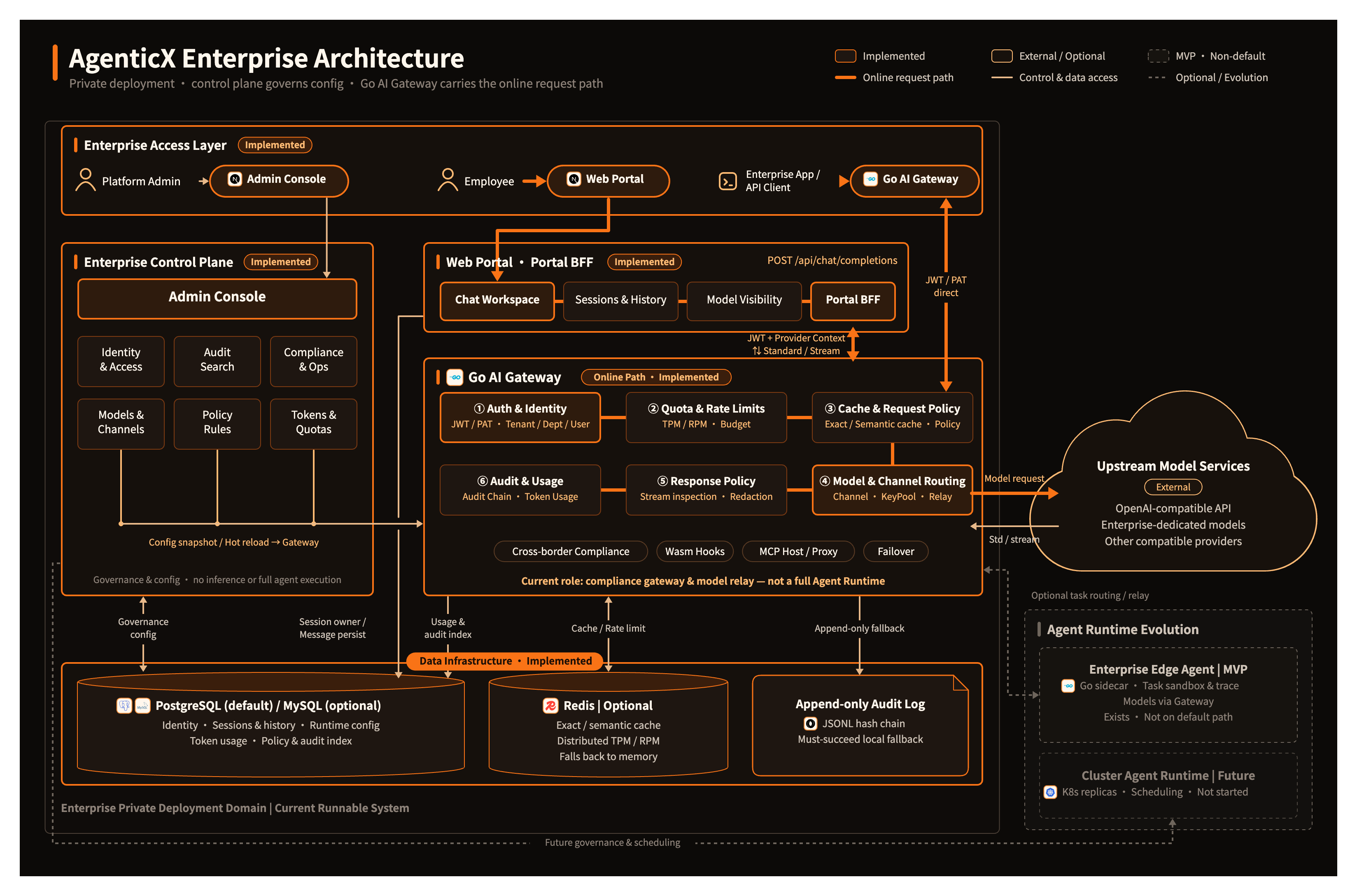
The Runtime itself is still easiest to read as five layers, from the user interface down to platform services.
Worked example: the same question, three doors
Scene. “Summarize this repo’s README.”
| Door | What you actually start | Where the loop runs |
|---|---|---|
| SDK | AgentExecutor(llm_provider=...).run(agent=, task=) | Your Python process |
| Near | App → local agx serve → AgentRuntime.run_turn | Studio on 127.0.0.1 |
| Enterprise | Portal → Go Gateway → upstream model | Gateway policy / quota; not AgentRuntime |
What you should see. Near: a chat pane, tool cards, ~/.agenticx/sessions/<id>/messages.json. Enterprise: a browser workspace and audit/policy hits if a rule fires. Do not expect Desktop panes behind the Gateway.
The three official drawings above are the product maps. Use them when you need the whole stack in one glance.
Tier 1: User Interface
Near Desktop
Electron + React + Zustand + Vite. Multi-pane chat, avatars, group chat, workspace, terminal, automation, and Voice Focus. See Near Desktop.
CLI (agx)
Full-featured command-line tool covering: serve, studio, loop, run, project, deploy, codegen, docs, skills, hooks, debug, scaffold, config management.
See CLI Reference →
SDK
Python SDK for embedding AgenticX into your own applications.
Tier 2: Studio Runtime
Session Manager
Manages user sessions, chat history persistence (messages.json), write locks, and in-memory state. Supports cross-session avatar status queries.
Meta-Agent
The CEO dispatcher. Dynamically orchestrates sub-agents, maintains active agent snapshots, and handles memory recall injection per turn. Built via agenticx/runtime/prompts/meta_agent.py.
Team Manager (AgentTeamManager)
Controls concurrent agent execution, archived snapshots (_archived_agents), owner_session_id session isolation, avatar_id binding, and global registry lookup.
Avatar & Group Chat
- Avatar Registry: CRUD operations for persistent agent identities
- Group Chat: Multiple routing strategies — user-directed (
@mention), meta-routed, round-robin - Group Router: Handles
@mentionparsing (full name / slug ID), intelligent routing to named members
Tier 3: Core Framework
Agent Execution Engine
Based on 12-Factor Agents methodology. The think-act loop processes tool calls, handles context overflow, and performs self-repair. Tool call sequences are validated to prevent provider 400 errors.
Orchestration Engine
Graph-based workflow with conditional routing and parallel execution. The Flow system provides decorator-based pipeline definition.
Tool System
- Function decorators (
@tool) - MCP Hub (multi-server aggregation)
- Remote Tools v2
- OpenAPI toolset
- Sandbox tools
- Skill bundles
Memory System
Hierarchical: core → episodic → semantic. Integrates with Mem0 for long-term persistence. Supports memory decay, hybrid search, and compaction/flush.
LLM Providers
Unified provider interface for 15+ LLMs with response caching, failover routing, and transcript sanitization.
Tier 4: Platform Services
Observability
Callback system, real-time metrics, Prometheus/OpenTelemetry integration, trajectory analysis, span tree, WebSocket streaming.
Protocols
- A2A: Inter-agent communication (client / server / AgentCard / skill-as-tool)
- MCP: Model Context Protocol for tool and resource access
Security
Leak detection, injection detector, policy engine, audit logging, sandbox (Docker / Microsandbox / Subprocess). Studio combines hooks, permissions, and path protection. It does not yet route every operation through one complete SafetyLayer.
Storage
- KV: SQLite, Redis, PostgreSQL, MongoDB, InMemory
- Vector: Milvus, Qdrant, Chroma, Faiss, PgVector, Pinecone, Weaviate
- Graph: Neo4j, Nebula
- Object: S3, GCS, Azure
Default Studio persistence is the ~/.agenticx file tree plus SQLite. Some third-party adapters remain placeholders and are not on the Studio main path.
Tier 5: Domain Extensions
GUI Agent
Desktop automation framework with A/B/C result classification using heuristic and VLM reflection modes.
Knowledge & GraphRAG
Document processing pipeline → chunkers / readers / extractors → graph builders (GraphRAG) → retrievers (vector / BM25 / graph / hybrid) → reranker.
AgentKit Integration
Pluggable integration layer for external agent frameworks.