编排
AgenticX 编排引擎。
编排
需要多个智能体或步骤按固定或条件顺序执行时才用编排。单轮对话请走 AgentRuntime.run_turn,不要硬套一张图。
两条互补 API:
- 图工作流 — 显式 DAG(
Workflow、Node、Edge) - Flow 装饰器 — Python 流水线(
@flow、@step);见 Flow
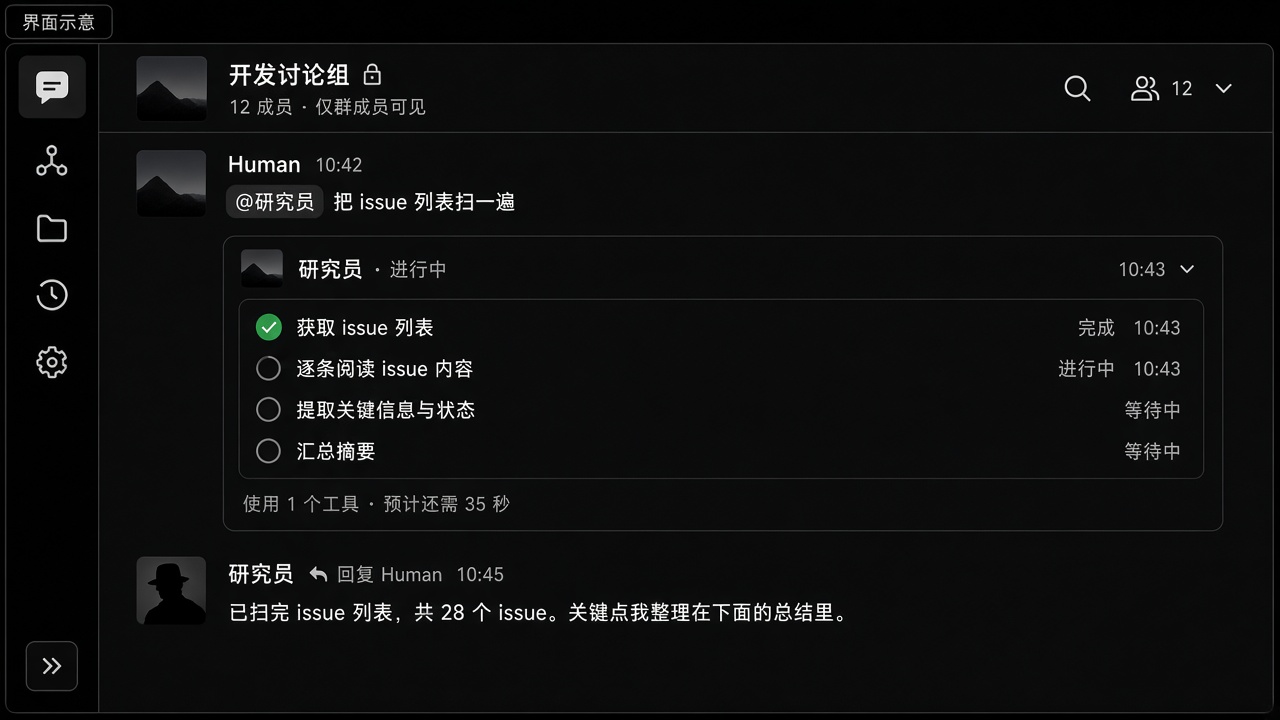
实践案例:群里 @,不要假的团队构造
场景。 Near 群聊里让研究员扫 issue。不要写 AgentTeamManager(agents=[...])。
- 建群(默认带 Meta)。输入
@研究员 把未关闭 issue 扫一遍。 group_router应把这轮交给该成员。他的回复对着你,不是客套 @ Meta。- 「已接收 / 正在调用 / 完成」折进该分身一张卡。
- 没写 @ 但正文明显是他的职责,也应优先他。否则 Meta 统筹或
delegate_to_avatar。
你会看到。 研究员一条线、一张进度卡、最终回答。delegate_to_avatar 跑在该分身真实 session,历史留在分身侧,不是影子 spawn。
SDK 里的图(Workflow / Flow)是进程内流水线,不是 Near 群聊的接线方式。
基于图的工作流
python
1from agenticx.flow import Workflow, Node, Edge23workflow = Workflow(id="research-pipeline")45# Define nodes (each node is an agent task)6fetch = Node(id="fetch", agent=fetch_agent, task=fetch_task)7analyze = Node(id="analyze", agent=analyze_agent, task=analyze_task)8report = Node(id="report", agent=report_agent, task=report_task)910# Define edges (data flow)11workflow.add_edge(Edge(source="fetch", target="analyze"))12workflow.add_edge(Edge(source="analyze", target="report"))1314result = workflow.run()
条件路由
python
1from agenticx.flow import ConditionalEdge23def route_based_on_result(output):4 if output.confidence > 0.8:5 return "publish"6 else:7 return "review"89workflow.add_edge(10 ConditionalEdge(11 source="analyze",12 condition=route_based_on_result,13 targets={"publish": publish_node, "review": review_node}14 )15)
并行执行
python
1from agenticx.flow import ParallelNode23# Run multiple agents concurrently4parallel = ParallelNode(5 id="parallel-research",6 nodes=[fetch_news, fetch_papers, fetch_code],7 merge_strategy="concat"8)9workflow.add_node(parallel)
Flow 装饰器
对于更简单的流水线,可使用 @flow 装饰器体系:
python
1from agenticx.flow import flow, step23@flow4class ResearchPipeline:56 @step7 def fetch_data(self, query: str) -> str:8 return self.fetch_agent.run(query)910 @step11 def analyze(self, data: str) -> dict:12 return self.analyze_agent.run(data)1314 @step15 def generate_report(self, analysis: dict) -> str:16 return self.report_agent.run(analysis)1718pipeline = ResearchPipeline()19result = pipeline.run(query="Latest AI research")
执行计划
对于复杂的多步骤任务,可使用 execution plan:
python
1from agenticx.planner import ExecutionPlan, PlanStep23plan = ExecutionPlan(4 steps=[5 PlanStep(id="1", description="Gather requirements", agent=analyst),6 PlanStep(id="2", description="Design architecture", agent=architect, depends_on=["1"]),7 PlanStep(id="3", description="Implement features", agent=developer, depends_on=["2"]),8 PlanStep(id="4", description="Write tests", agent=tester, depends_on=["3"]),9 ]10)1112results = plan.execute()