工具
AgenticX 工具系统概览与用法。
工具
工具是模型与环境的契约:文件系统、Shell、MCP、REST、技能。运行时收集 schema、路由 tool_calls,再经策略和钩子执行。
SDK 用 @tool / BaseTool。Near / Studio 用 agenticx/cli/agent_tools.py 里的 STUDIO_TOOLS 加 dispatch_tool_async。不要假设库里每个工具都会出现在 Studio。
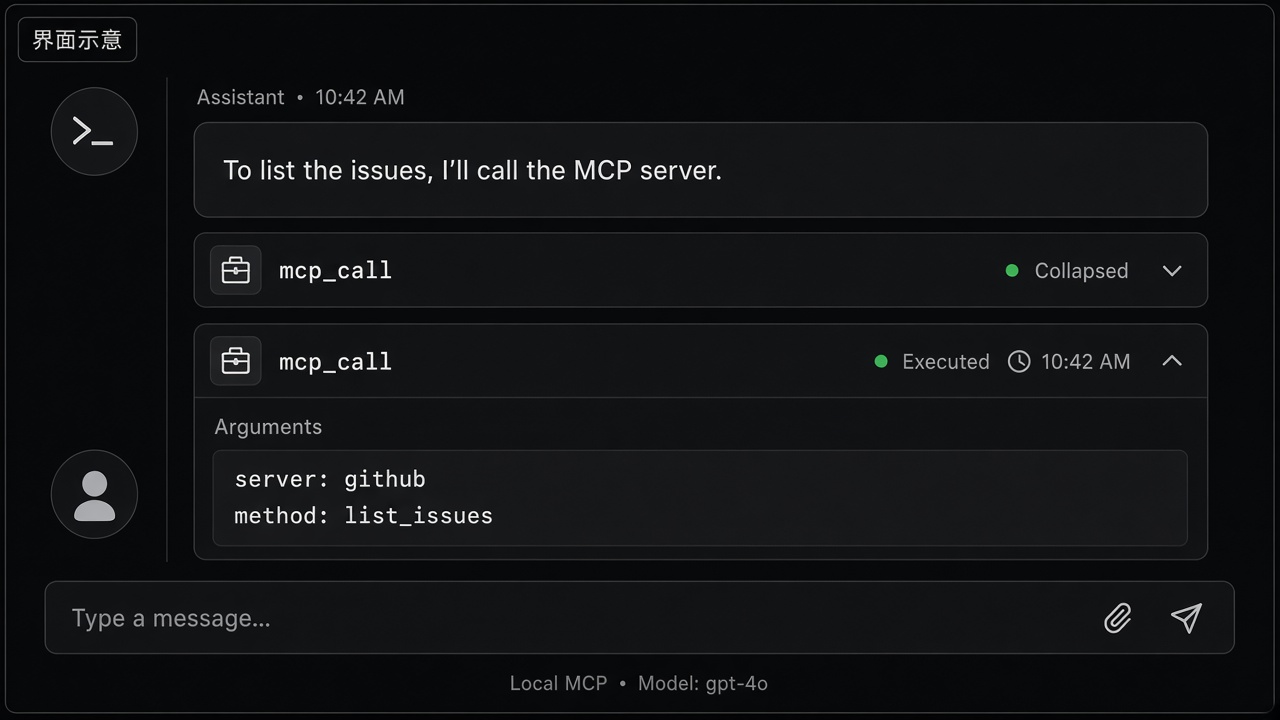
实践案例:一张工具卡,不要每个调用一条气泡
场景。 「列出这个仓库的未关闭 issue」需要 GitHub MCP。
- 设置 → MCP:该服务必须显示已添加(绿点)。「已连接」不等于
mcp_call一定成功。 - 在对话里要 issue 列表。模型应经
dispatch_tool_async走mcp_call(或已发现的工具名)。 - 群聊要把「正在调用 / 工具完成」折进该分身一张卡。普通窗格用
ToolCallCard,默认折叠,只有需要行内确认才展开。
你会看到。 工具卡和助手气泡对齐。展开才能看参数和返回。失败应写出可读原因(找不到 npx、Docker 卡住、schema 不符),不能只有转圈。
| 关注点 | 主要组件 |
|---|---|
| 声明工具 | @tool、FunctionTool、BaseTool 子类 |
| Studio / 工作区 | STUDIO_TOOLS(OpenAI 风格 function schema + 分发) |
| 外部 MCP | MCPHub、MCPClientV2、RemoteTool |
| 规范驱动 HTTP API | OpenAPIToolset |
| 技能包 | SkillBundleLoader、SkillTool |
| 执行 | ToolExecutor(agenticx.tools.executor) |
| 隔离提示 | SandboxPolicy、SandboxConfig |
`@tool` 装饰器
使用 agenticx.tools.function_tool.tool 将普通函数转为 FunctionTool(BaseTool)。
参数
| 参数 | 作用 |
|---|---|
name | 暴露给模型的工具 id;默认为函数名 |
description | 覆盖从 docstring 自动解析的摘要 |
args_schema | 可选 Pydantic BaseModel;省略时根据类型注解与 docstring Args 构建 |
timeout | 单工具超时(秒),与 executor 默认值合并 |
organization_id | 可选租户范围,用于策略 / 存储 |
行为
- 解析 docstring(短描述、长描述、各参数说明)。
- 将参数映射为 Pydantic 模型,用于导出 JSON Schema 与运行时校验。
1from agenticx.tools.function_tool import tool23@tool(name="add", description="Add two integers.", timeout=5.0)4def add(a: int, b: int) -> int:5 """Add a and b.67 Args:8 a: First operand.9 b: Second operand.10 """11 return a + b
内置 Studio 工具
Studio 会话使用 agenticx.cli.agent_tools 中的 STUDIO_TOOLS:一组 OpenAI 风格 function 定义,绑定异步 handler。核心类别:
| 名称 | 用途 |
|---|---|
bash_exec | 在工作区执行 Shell 命令(含守卫与确认流程) |
file_read | 读取文件内容,可选行范围 |
file_write | diff 预览与用户确认后整文件写入 |
file_edit | diff 预览与用户确认后局部替换 |
list_files | 列出工作区文件 |
codegen | 驱动代码生成引擎(agent / workflow / tool / skill 目标) |
mcp_connect、mcp_call、mcp_import | 连接 MCP 服务器、调用工具、导入外部 MCP JSON |
skill_use、skill_list | 激活或枚举技能包 |
todo_write | 会话结构化任务列表 |
scratchpad_read、scratchpad_write | 会话草稿板 |
memory_append、memory_search | 轻量记忆辅助 |
lsp_goto_definition、lsp_find_references、lsp_hover、lsp_diagnostics | LSP 导航与诊断 |
仅 Meta 可用的工具(委派、资源检查等)单独定义(META_AGENT_TOOLS);分身通常获得上述 Studio 子集。
MCP Hub
MCPHub(agenticx.tools.mcp_hub)聚合多个 MCP 服务器:
- `MCPClientV2`:每个
MCPServerConfig一个客户端,持久会话,discover_tools()/call_tool()。 - `discover_all_tools()`:合并工具列表并构建路由表(名称冲突时用前缀路由名处理)。
- `get_tools_for_agent()`:当
auto_mode=True时返回可注入的MCPHubTool实例(BaseTool)。 - `MCPHubConfig`:Pydantic 模型,含
servers: List[MCPServerConfig]与auto_mode。
1from agenticx.tools.mcp_hub import MCPHub, MCPHubConfig2from agenticx.tools.remote_v2 import MCPServerConfig34config = MCPHubConfig(5 servers=[6 MCPServerConfig(name="docs", command="npx", args=["-y", "@some/mcp-server"]),7 ],8 auto_mode=True,9)10# hub = MCPHub.from_config(config) # then await hub.discover_all_tools()
配置文件
agenticx.tools.remote中的load_mcp_config()读取 JSON 文件(默认~/.cursor/mcp.json)为Dict[str, MCPServerConfig]。- 可在项目本地维护相同结构(例如
mcp_config.json),并显式传入路径加载。
远程工具
AgenticX 不提供名为 RemoteToolProvider 的类。远程能力建模如下:
| 类型 | 用途 |
|---|---|
RemoteTool | 包装单个 MCP 工具的 BaseTool,绑定 MCPServerConfig |
MCPClient | 旧版客户端,列出工具并构造 RemoteTool |
MCPClientV2 | 推荐的基于会话的客户端;MCPHub 内部使用 |
MCPServerConfig 字段包括 command、args、env、timeout、可选 cwd、enabled_tools 与 assign_to_agents(用于过滤)。
OpenAPI 工具集
OpenAPIToolset(agenticx.tools.openapi_toolset)从 OpenAPI 3.x 或 Swagger 2.0 构建 BaseTool 实例:
OpenAPIToolset.from_file(path)OpenAPIToolset.from_url(url)
各 operation 成为可调用工具,带生成的参数模型与按规范执行的 HTTP 请求。
技能包
技能遵循 Anthropic 风格 SKILL.md 布局与 YAML front matter。`SkillBundleLoader`(agenticx.tools.skill_bundle)扫描标准路径(.agents/skills、.agent/skills、~/.agents/skills、.claude/skills、包内置等),应用可选 `SkillGate` 规则(metadata.agenticx.gate),并将技能暴露为工具(如 `SkillTool`)以支持列表/读取与渐进披露。
会话级注入
- Studio 中
skill_use/skill_list与 loader 联动,激活的技能影响当前会话上下文。 SkillBundleLoader接受execution_backend,运行技能载荷时可走沙箱或替代执行路径。
AGX Bundle 安装也会落在 `~/.agenticx/skills/bundles/`,该路径自动纳入扫描,无需额外配置即可发现 bundled 技能。
AGX Bundle
AGX Bundle(agenticx.extensions)是可分发目录包,将 Skills、MCP 服务器配置、Avatar 预设与 Memory 模板组合为单一单元。
1my-bundle/2├── agx-bundle.yaml3├── skills/4│ └── my-skill/SKILL.md5├── mcp/6│ └── server.json7├── avatars/8│ └── preset.yaml9└── memory/10 └── template.md
关键模块:
| 模块 | 用途 |
|---|---|
agenticx.extensions.bundle | 解析 agx-bundle.yaml,强制安全相对路径 |
agenticx.extensions.installer | 安装/卸载 bundle,管理 ~/.agenticx/bundles.json |
agenticx.extensions.registry_hub | 多源市场搜索与安装 |
快速安装:
1from pathlib import Path2from agenticx.extensions.installer import install_bundle34result = install_bundle(Path("./my-bundle"))5print(result.skills_installed, result.mcp_servers_installed)
详见 扩展与技能生态,含 AGX Bundle 格式、市场配置与 Desktop UI walkthrough。
工具执行器
ToolExecutor(agenticx.tools.executor)是 BaseTool 实例的共享执行流水线。
典型流程(`execute` / `aexecute`)
- 可选 `policy_stack.check(tool.name)` — 声明式拒绝规则(受 OpenClaw 启发)。
- 从工具与
default_timeout解析超时。 - 可选 `SafetyLayer.validate_tool_input` — 运行前拦截或标记参数。
- `tool.run` / `tool.arun` — 内部按 `args_schema`(Pydantic)校验 kwargs。
- 可选对字符串结果执行 `SafetyLayer.sanitize_tool_output`。
- 工具上可选 `post_state_hook` 处理状态 sidecar。
- 追加 `ToolCallingRecord`(成功或失败),滚动保留。
重试与超时
| 构造参数 | 含义 |
|---|---|
max_retries | 失败后额外尝试次数(默认 3) |
retry_delay | 重试间隔(秒) |
default_timeout | 工具未设 timeout 时的回退值 |
明显不可重试的情况(如 ToolTimeoutError)会跳过重试。
相关
ApprovalRequiredError会直接抛出,不按普通失败处理。- 同一类上的
sandbox_config: SandboxConfig可为代码执行辅助启用高级后端(subprocess、microsandbox、docker)。
凭据管理
`CredentialStore`(agenticx.tools.credentials)默认在 ~/.agenticx/credentials 下存储加密的键值材料(安装 cryptography 时使用 Fernet)。供工具或 MCP env 映射在运行时需要的 API 密钥与 token。
`SecurityManager`(agenticx.core.security)也内嵌 CredentialStore,用于更高层的权限与审计集成。
沙箱集成
`SandboxConfig`(agenticx.tools.executor)为高级运行选择后端:
| 后端 | 隔离 |
|---|---|
subprocess | 独立 OS 进程 |
microsandbox | 沙箱运行时(可用时) |
docker | 容器隔离 |
auto | 解析器自动选择实现 |
`SandboxPolicy`(agenticx.safety.sandbox_policy)根据风险等级或工具名启发式推荐后端:
| 推断/指定风险 | 建议后端 |
|---|---|
LOW | 不强制后端(None) |
MEDIUM | subprocess |
HIGH / CRITICAL | docker |
可选 `ToolRiskProfile` 按 tool_name 覆盖推断(force_backend、network_enabled、max_timeout)。